
The release will occur during your normal daily maintenance window (typically between midnight to 3 am local time).
New Features
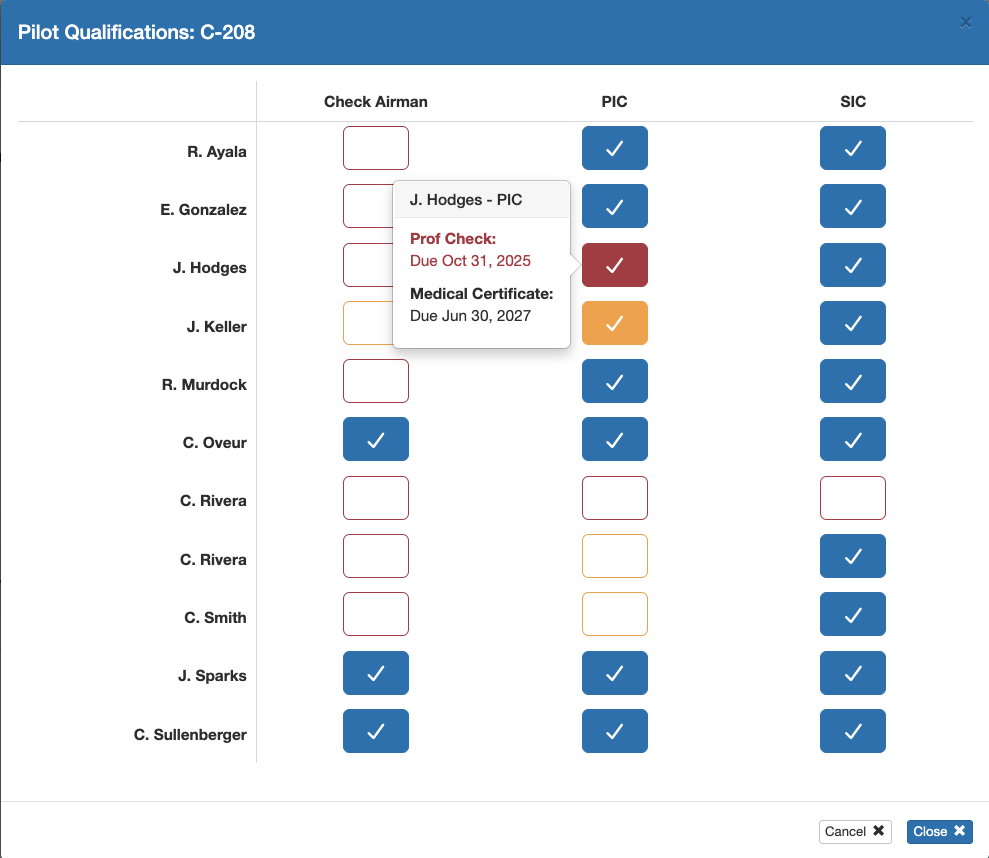
- Pilot qualifications tracking is now available. Beyond simply being a tool to track qualifications of your flight crew, this feature integrates with the flight scheduling feature set and allows schedulers to ensure that crew have the proper qualifications for the mission. See the documentation for details.
Enhancements
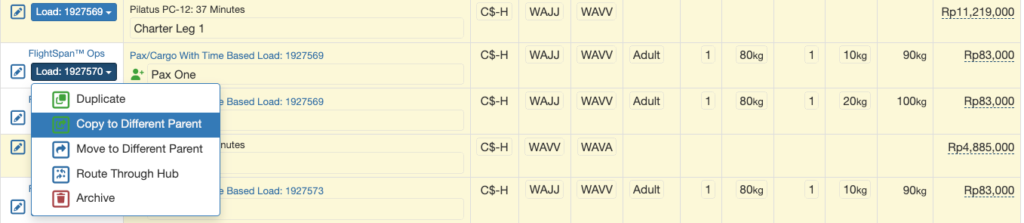
- Child loads on time-based (charter) Payment Loads can now be duplicated and added to a new parents
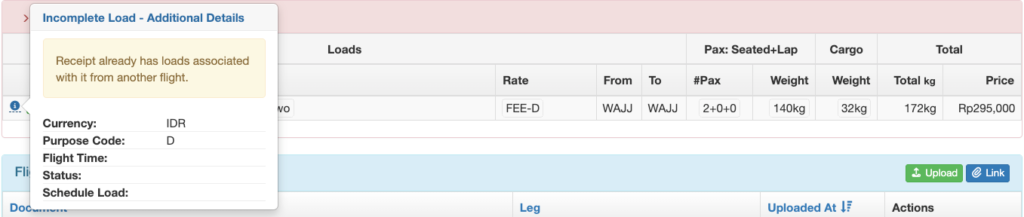
- Added warning feedback on the Incomplete Loads section of the Flight Record to let the user know that the selected receipt already has associated loads
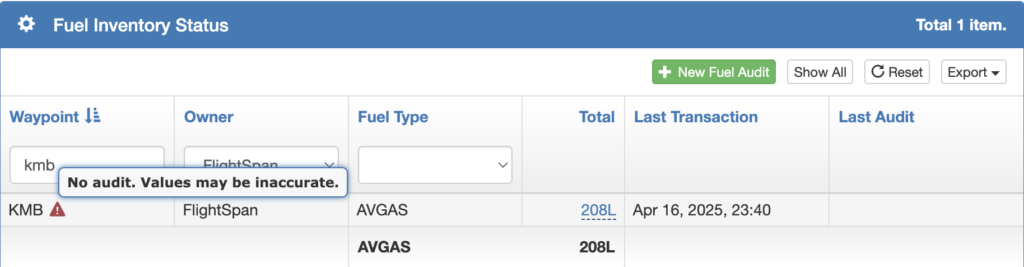
- Added the ability to see the fuel inventory (with a warning) for waypoints without a fuel audit
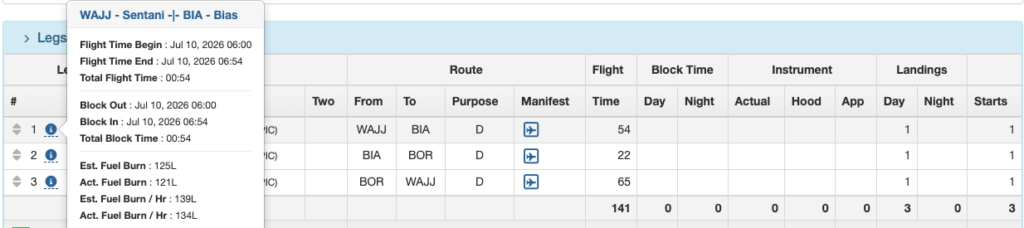
- Estimated fuel and actual fuel are now displayed on the leg information hover on the Flight Record
- The DFR Flight Number can now be customized using the “Custom Flight Number Format” Company Custom Setting
- Users with permission to quick edit the Payment Load cargo weight can now do so for loads with zero cargo weight
- The passenger weight value is now automatically updated on the Payment Load when a Pax Details record is updated from the Payment Details page
- The World Magnetic Model for calculating magnetic variation has been updated
- Optimized the date format in the Staff Fatigue Status user interface
- The Deferred Income Summary report is now sorted by account number
- Added Company Tax ID to the header of the invoice report
- Added a company setting to print a page for each destination on the Destination Manifest even if there are no loads
- ICAO waypoint ID, national identifier, and name fields have been added to the FOQA API
- Open subtotals rates can now be used in quote and request surcharges
- On the time app when you tap the clock icon to manually clock in and out, the mobile version now uses a numeric keypad, and all versions auto select the field and auto advance to the next block
- Updated the Workato billing export to exclude refunds and to append the Group ID with “A” when the value is negative
Bug Fixes
- Staff Detail view failed when vacation allowance was set to zero
- Could not edit and existing calendar event from the Scheduling Calendar
- When multiple non manifest loads were present, manifest reports were not showing the grand totals
- DFR Totals by Aircraft report summary totals did not match column totals
- Departure times inaccurate on email notifications for flight legs two and following
- Scheduled flights occasionally did not link properly to Flight Records when the DFR was uploaded
- Users logged into FlightSpan via Single Sign On were unable to access the time app
- Payment Loads without cargo weight failed to update if the cargo weight was added on the EFB and then the DFR was uploaded
- The logged in staff details did not sync with the Tools app.
- The create route form on the Scheduling Calendar stopped working when it extended to the bottom of the window
- Missing pencil icon in the Incomplete Loads section of the Flight Record
New Permissions
- FlightSpanOps / Settings: Staff/Users / Pilot Qualifications List View
- FlightSpanOps / Settings: Staff/Users / Pilot Qualifications Create
- FlightSpanOps / Settings: Staff/Users / Pilot Qualifications View Details
- FlightSpanOps / Settings: Staff/Users / Pilot Qualifications Delete
- FlightSpanOps / Settings: Staff/Users / Pilot Qualifications Edit
- FlightSpanOps / Settings: Staff/Users / Staff Pilot Qualifications Update
Removed Permissions
- None
New Company Custom Settings
- Print Empty Pages On Destination Manifest
- Custom Flight Number Format – Allows you to customize the DFR flight number format
New Company EFB Preferences
- Print Basic Flight Plan / NavLog with DFR? – Enables upload of the Basic Flight Plan / NavLog
- Allow Auto Trip Feature? – Enables sending your trip manifest only once before the first takeoff, and reporting on the ground only once after the final landing. (Not yet active in the EFB)
New Aircraft Type EFB Preferences
- Automatically Fire Enabled Checklists? – In flight checklists can be set for manual activation only
New Permissions Added To Standard Roles:
- All of the following permissions were added to these three roles:
- Admin – All FlightSpan Settings
- Admin – All Staff/User Settings
- Manage – Chief Pilot
- FlightSpanOps / Settings: Staff/Users / Pilot Qualifications List View
- FlightSpanOps / Settings: Staff/Users / Pilot Qualifications Create
- FlightSpanOps / Settings: Staff/Users / Pilot Qualifications View Details
- FlightSpanOps / Settings: Staff/Users / Pilot Qualifications Delete
- FlightSpanOps / Settings: Staff/Users / Pilot Qualifications Edit
- FlightSpanOps / Settings: Staff/Users / Staff Pilot Qualifications Update
- View – Staff/User
- FlightSpanOps / Settings: Staff/Users / Pilot Qualifications List View
- FlightSpanOps / Settings: Staff/Users / Pilot Qualifications View Details
Existing Permissions Added To:
- View – Staff/User
- FlightSpanOps / Settings: Staff/Users / Exceedances View List User
- FlightSpanOps / Settings: Staff/Users / Flight Attendant View Details
- FlightSpanOps / Settings: Staff/Users / Flight Attendant View List
- FlightSpanOps / Settings: Staff/Users / Mechanic View Details
- FlightSpanOps / Settings: Staff/Users / Mechanic View List
- FlightSpanOps / Settings: Staff/Users / Roster View Details
- FlightSpanOps / Settings: Staff/Users / Roster View List
Existing Permissions Removed From:
- None
New Standard Roles Created
- Admin – Pilot Qualifications
- FlightSpanOps / Settings: Aircraft
- Type View List
- Type View Details
- FlightSpanOps / Schedule
- Scheduling Calendar
- FlightSpanOps / Settings: Staff/Users
- Pilot View List
- Pilot Qualifications Create
- Pilot Qualifications Delete
- Pilot Qualifications View List
- Pilot Qualifications Edit
- Pilot Qualifications View Details
- Pilot View Details
- Staff Pilot Qualifications Edit
- FlightSpanOps / Settings: Aircraft
- Manage – Pilot Qualifications
- FlightSpanOps / Settings: Aircraft
- Type View List
- Type View Details
- FlightSpanOps / Schedule
- Scheduling Calendar
- FlightSpanOps / Settings: Staff/Users
- Pilot View List
- Pilot Qualifications View List
- Pilot Qualifications View Details
- Pilot View Details
- Staff Pilot Qualifications Edit
- FlightSpanOps / Settings: Aircraft