
The release will occur during your normal daily maintenance window (typically between midnight to 3 am local time).
Enhancements
- Added distance to the scheduled leg hover details on the Schedule Detail view
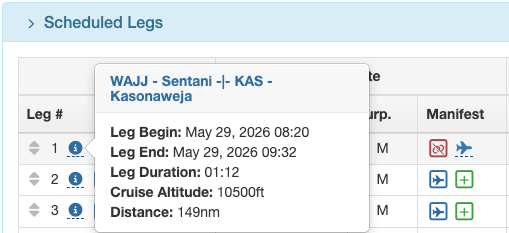
- Non-standard equipment is now displayed on the scheduled flight legs list, indicated by the equipment icon being shaded amber.

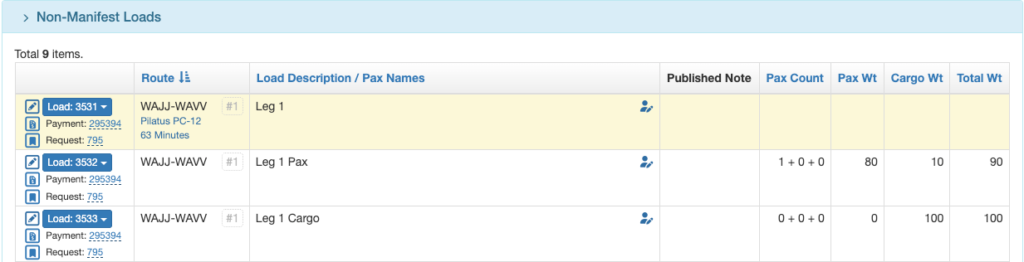
- Payment Loads that originate from a Flight Request are now separate loads on the non-manifest loads section of the Schedule Detail (standardized with other types of loads).
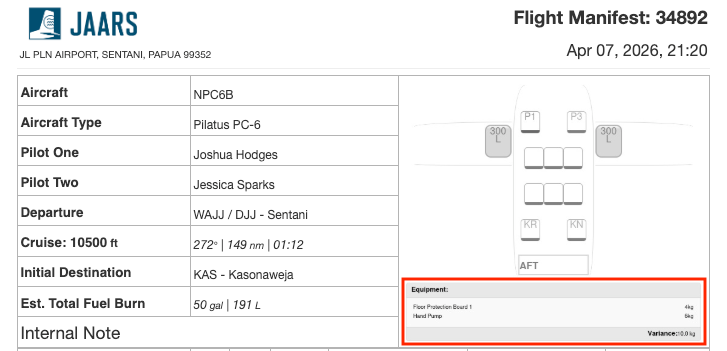
- A non-standard equipment summary is now included on complete and condensed manifests
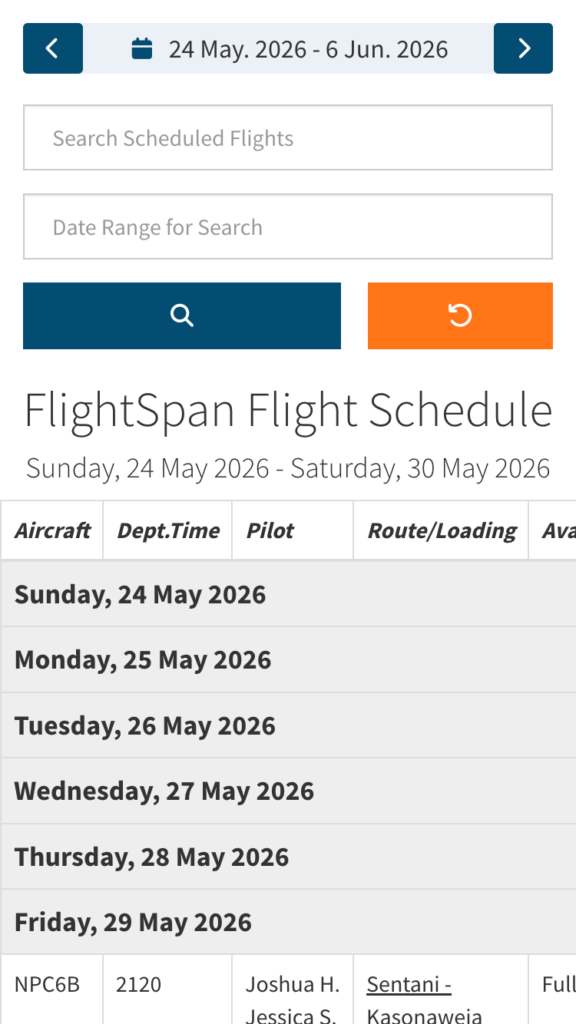
- A link to the published flight schedule has been added to the time clock app
- If there is no manifest loading, for decluttering purposes, printed complete and condensed manifests no longer display the Manifest Detail section of the report
- Non-manifest loading has been relabeled “Other Loads” on the complete and condensed manifest reports
- If there is no loading of any kind, printed complete and condensed manifests now display a blank Loads section
- Aircraft Type has been added as a rate adjustment criteria for both Data Substitutions and Price Line Items making it possible to fire different rate adjustments based on aircraft type.
- When creating a new Payment from a Flight Request, the currency from the Request is honored and is now used instead of the company default currency
- Account Tax ID can now be set in the account detail; when set, it will appear on Payment Invoices
- If an email address has been set for a given company Location, that address now shows in the header of the Payment Invoice and the Proforma Invoice
- Creditor Name can now be hidden on Payment Invoices by customizing the report
- Price line items on printed receipts and invoices are now merged when the names match exactly
- Added a new company setting to default Payment loads “Schedule Additional Flight Time” to be unchecked through the app
- Added a new company setting to spell out in words the amount due on certain reports including the Cash Receipt, Payment Invoice, Proforma Invoice, and Printed Quote
- Added a new company setting to display or hide the Language Communities List on the Waypoints page and the Language Communities field on the Waypoint Detail
- Changed schedule notification template variables related to passenger count to return only a number (including 0) and does not include the words Adult, Child, or Infant. Please update notification templates accordingly.
- Target Airframe Time can now be set on unscheduled maintenance events
- Certain aircraft type preferences can now only be edited by super users. Contact FlightSpan Support to adjust these preferences or to be added as a super user.
- Added the ability for users to view inactive aircraft types
- Sorted the aircraft type list alphabetically by make, then model
- Removed unneeded aircraft type preferences
Bug Fixes
- Quote tool not working
- Workato billing export issue
- Aircraft type preference max characters issue
- Route export to GTN error when one waypoint is less than a degree south of equator
- Flight request markup not applied when processing a new payment
- Scheduled load leg number was not turning red when it should have
New Permissions
- Flight Reports
- Records
- MOZ Formulario Tax Report
- Records
Removed Permissions
- None
New Company Custom Settings
- Display Amount Due In Words On Quote Invoice And Receipt Reports
- Schedule Additional Flight Time On Time Based Loads
- Show Language Communities
New EFB Preferences
- Record Fuel On Board at Enroute Waypoints? – When set to Yes, as you cross an en route waypoint, a prompt to enter fuel will pop up, prefilled with estimated fuel at the waypoint
Removed EFB Preferences
- Aft Load Compartment Arm (meters) – the arm is now pulled from the performance database and is not user editable
- Max Aft Load Compartment Load (kg) – the weight is now pulled from the performance database and is not user editable
New Permissions Added To Standard Roles:
- Flight Reports / Records / MOZ Formulario Tax Report added to:
- Admin – All FlightSpan Settings
- Manage – Print Records Reports
Existing Permissions Added To:
- None
Existing Permissions Removed From:
- None
New Standard Roles Created
- None