
The release will occur during your normal daily maintenance window (typically between midnight to 3 am local time).
New Feature
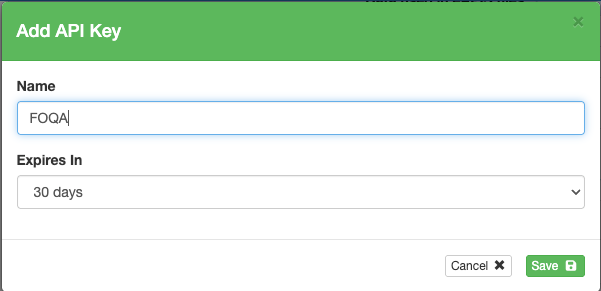
- Added Flight Operational Quality Assurance (FOQA) API for third-party data analysis including API key management. See the documentation for instructions.
Enhancements
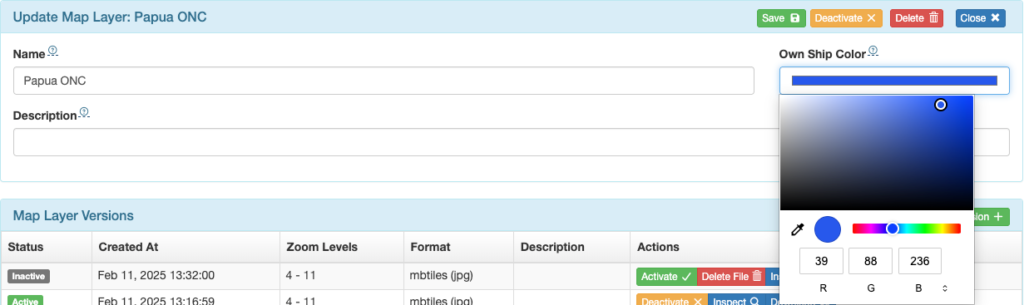
- To ensure good contrast between map layers and EFB Own Ship icons, different EFB Own Ship colors for different map layers can now be set. See the documentation for details.
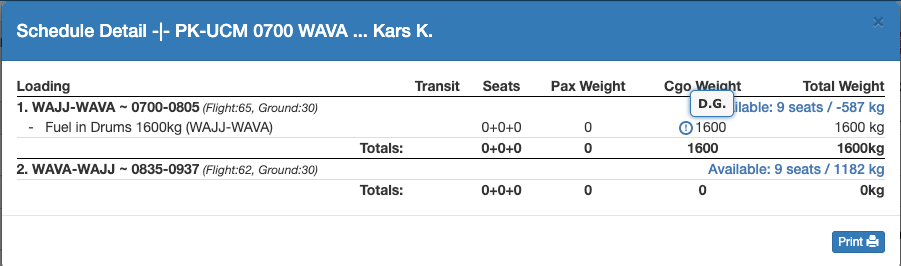
- The Scheduled Flight Loading Report now includes a Dangerous Goods (DG) indicator on DG loads
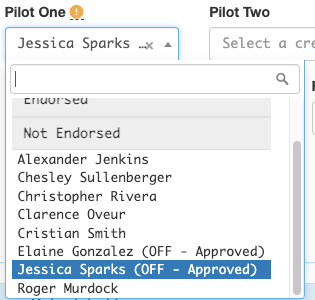
- Time off status is now always displayed in scheduled flight pilot dropdowns, and the pilots may now be scheduled even when they have approved time off
- Renamed the EFB API Tab to EFB Login and changed the column header names to be more intuitive

- A user creating a load package (Advanced Package Management) can now create a one-time unlisted cargo item
- Maintenance events without actual or projected start dates are now sent to the EFB
- A new Company Custom Setting is now available to disable the “Create Manifest?” prompt when dragging a load onto the Scheduling Calendar
- A new Company Custom Setting is now available to require an Account on cash-type Payments
- Time labels on the left side of the Scheduling Calendar are now always visible when scrolling right to view additional aircraft
- Documents linked to a flown scheduled flight or to an inactive waypoint can now be unlinked or deleted
- Departure and arrival fuel from the uploaded DFR are now stored in the database
- Staff members are now prevented from resolving their own duty or flight time exceedances, and notifications are not cleared if a user views their own exceedance
- Added the {request_date} field (the requested flight date) to the Schedule Updated email notification template
- Change history records due to database rounding differences of less than 0.01 (except for Currency Conversions) are no longer recorded
- The flight request details sent out in notification emails have been cleaned up
- The “Runway/Aircraft Type Data” Database Export Report has been expanded to include more helpful data
- Itemized taxes on the Netsuite 5 billing export and added the payment transaction code to the memo
Bug Fixes
- Payment load cost was only being partially updated when changing the cost of an open total rate from the deposit details page
- Users with permission to view the time off types list were unable to view the list
- Latency issue with microsoft calendar sync.
- Holidays with additional days were not being included on the scheduling calendar when the selected date range did not include the original date
- Split scheduled flight functionality was failing intermittently.
- Netsuite 2 Billing Export was failing
- Daily deposits report was not printing
- Fuel transaction export was failing.
- Unflown or data-entry-required non-manifest loads without an associated request or payment were deleted from a scheduled flight after the DFR was uploaded
- Payments could be created from flight requests, causing a negative balance on prepaid accounts
- Flight request quotes were not honoring the nominal cruise speed company setting
- Estimate Amount on the Request Email Template was not working
- Date inputs were failing to validate when French was selected.
- Missing DG flag on scheduled loads list
- Newly created scheduled flight legs (as a result of dropping loading onto an existing scheduled flight) lacked a valid cruise altitude
- Sometimes a linked flight was missing in the flights dropdown after the flight was closed
- A flight request’s connecting flight date was shown as Jan 1 1970
- The currency setting in Company EFB Preferences displayed as an ID rather than the ISO name
New Permissions
- FlightSpanOps
- Settings: Company
- API Key Access
- API User Create
- API User Delete
- API User View List
- API User Edit
- API User View Details
- FOQA
- Settings: Staff / Users
- Staff Api Keys Manage
- Settings: Company
Removed Permissions
- None
New Company Custom Settings
- Disable Create Manifest Prompt When Dragging Loading Onto Scheduling Calendar
- Require Account Id On Cash Payments
New EFB Preferences
- None
New Permissions Added To Standard Roles:
- Admin – All FlightSpan Settings
- FlightSpanOps / Settings: Company
- API Key Access
- API User Create
- API User Delete
- API User View List
- API User Edit
- API User View Details
- FOQA
- FlightSpan Ops / Settings: Staff/Users
- Staff Api Keys Manage
- FlightSpanOps / Settings: Company
- Admin – All Company Settings
- FlightSpanOps / Settings: Company
- API Key Access
- API User Create
- API User Delete
- API User View List
- API User Edit
- API User View Details
- FOQA
- FlightSpanOps / Settings: Company
- Admin – All Staff Settings
- FlightSpan Ops / Settings: Staff/Users
- Staff Api Keys Manage
- FlightSpan Ops / Settings: Staff/Users
Existing Permissions Added To:
- None
Existing Permissions Removed From:
- None
New Standard Roles Created
- Admin – Manage APIs
- FlightSpanOps / Settings : Company
- Api Key Access
- API User Delete
- API User View List
- API User Edit
- API User View Details
- Deregister Google Api
- Deregister Microsoft Calendar Api
- EFB Password Update
- FOQA
- FlightSpanOps / Settings : Staff/Users
- Staff Api Keys Manage
- Staff View List
- Staff View Details
- FlightSpanOps / Settings : Company
- Manage – FOQA Data
- FlightSpanOps / Settings : Company
- Api Key Access
- FOQA
- FlightSpanOps / Settings : Company