
Automatic Monitor
This v2track feature checks the aircraft’s speed and location in relation to your v2track runway database.
It sends alerts if:
- The aircraft lands at a location not in your runway database, or
- If the last transmission was received while traveling at speed between runways
In this example, the alert on the v2track website indicates that NPC6E landed 9 miles southeast of the Eipomek runway.

Note: The Automatic Monitor feature is not available in the USA, Australia, or New Zealand.
Manual FlightWatch
Manual FlightWatch is manually activated and generates loss-of-tracking alerts if the tracker stops sending data for a specified period (e.g. 10 minutes) when Manual FlightWatch is active. If you desire flight monitoring advisory alerts in the USA or New Zealand, you must use Manual FlightWatch.
Manual FlightWatch is generally more comprehensive alerting than the Automatic Monitor, as it can detect incidents on takeoff and landing (if power is lost to the tracker), and is recommended for use in all countries. However, it does require pilot activation and deactivation. (When using FlightSpan™, activation and deactivation is integrated into the normal workflow and is accomplished automatically when sending trip manifests and on the ground reports.)
For manual activation of FlightWatch through FlightSpan, set the Company EFB Preference to Yes.

Manual FlightWatch will be activated by sending the FlightSpan trip manifest, and will be deactivated by reporting on the ground.
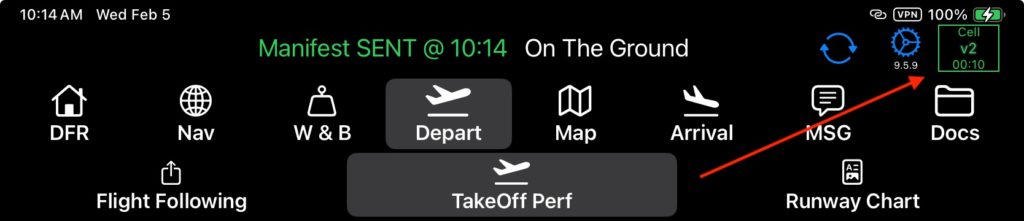
- When Manual FlightWatch is active and FlightSpan is connected to the v2 tracker, the v2 status cluster and the box will be green
- When Manual FlightWatch is active and FlightSpan is attempting to connect to the v2 tracker the v2 status cluster and the box will be yellow
- When Manual FlightWatch is active and FlightSpan initially loses connection to the v2 tracker the box is gray (FlightSpan will automatically try to reconnect to the tracker and when it does the box will turn yellow)
- When Manual FlightWatch is deactivated, the box disappears
Manual FlightWatch alerts will be visible to anyone logged into the v2track website.

Note: It’s important to properly configure alerts on the v2track website. See the v2track Use With FlightSpan documentation for details.
For more information on alerts, see the v2track Flight Following Alert Box : v2track Support documentation.
.